5 AI Transcription Tools for Meetings (2026 Roundup)
The short version
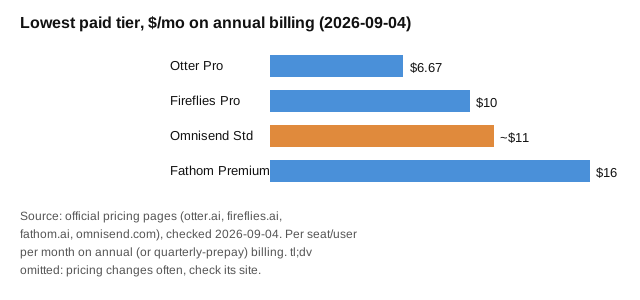
TL;DR: If your meetings live on Zoom, Meet, or Teams, start with Fathom - free forever plan with unlimited recordings and transcripts. It costs nothing to try and paid plans start at $16 per user per month (annual billing). Then pipe your summaries into follow-up emails with Omnisend - free plan, Standard from about $11 per month for small lists so action items actually get done. Details below, based on official pricing pages checked September 2026.Last updated: 2026-09-04
Meeting notes are the tax nobody wants to pay. Someone has to write them, nobody reads them, and the action items die in a doc somewhere. AI transcription tools fix the first half of that problem: they join your call, transcribe everything, and hand you a summary with action items. The second half - getting people to act - is still on you, which is why the smart setup pairs a transcription tool with a follow-up system.
This roundup covers four dedicated meeting transcription tools plus one follow-up pick, with prices verified from official pricing pages. AI models keep getting better at this job - OpenAI reported on 2026-09-03 that its new GPT-6 Astra model reviewed 41 documents in minutes for customer Legora, and Google's Gemini Spark gained the ability to manage Google Photos libraries (TechCrunch, 2026-09-04). Better models mean better summaries, so this category is worth revisiting now.
Which AI transcription tool should you pick?
| Tool | Best for | Starting price | Free plan? |
|---|---|---|---|
| Fathom | Most teams - free unlimited transcription | $0; Premium $16/user/mo annual | Yes, generous |
| Otter.ai | High-volume note takers, multi-language needs | Pro $6.67/mo annual, $13.59/mo monthly | Yes, 300 min/mo |
| Fireflies.ai | Sales teams, CRM sync, conversation analytics | Pro $10/seat/mo annual ($18 monthly) | Yes, limited |
| tl;dv | Clip sharing and async catch-up | Free plan; paid tiers per seat (check pricing page) | Yes |
| Omnisend | Turning meeting follow-ups into automated emails | Free plan; Standard from about $11/mo | Yes |
What does Fathom cost and who is it for?
Fathom is the easiest recommendation in this category because the free plan is genuinely useful: unlimited recordings, unlimited transcription, and instant AI call summaries at $0. No minute caps pushing you to upgrade after two weeks.
Is Otter.ai still worth it?
Otter.ai is the veteran here and still the strongest option if you transcribe a lot outside of live meetings - it handles imported audio and video files, supports transcription in English, Spanish, French, German, Japanese, and Chinese, and offers custom vocabulary for names and jargon.
What is Fireflies.ai good at?
Fireflies.ai aims past transcription into conversation intelligence: topic trackers, sentiment analysis, speaker talk-time analytics, and CRM integrations. It records Zoom, Google Meet, MS Teams, and more, with a Chrome extension option that avoids sending a bot into the call.
Should you try tl;dv?
tl;dv (pronounced "too long, didn't view") leans into async work: timestamped clips and soundbites you can share so teammates skip the meeting entirely. If your problem is too many meetings rather than too few notes, this angle matters.
How do you make sure action items get done?
Here is the honest gap in every transcription tool: a perfect summary sitting in an app nobody opens changes nothing. The teams that get value route decisions and deadlines into a channel people actually read - email. That is where Omnisend fits: take the action items from your meeting summary and turn them into an automated follow-up sequence.
Quick recap: pick in 5 minutes
- Need free unlimited meeting notes? Start with Fathom.
- Transcribe uploads or need Spanish, French, German, Japanese, or Chinese? Get Otter Pro.
- Run a sales team and want talk-time analytics plus CRM sync? Get Fireflies Business.
- Want shareable clips so people skip meetings? Try tl;dv.
- Want follow-up emails to send themselves? Add Omnisend and automate the recap.
FAQ
Do AI transcription tools work with Zoom, Teams, and Google Meet?
Yes. Fathom, Otter, Fireflies, and tl;dv all cover the big three, usually by sending a notetaker bot into the call. Fathom also offers a bot-free capture option in beta for Mac.
Are free plans enough?
Often yes for light use. Fathom's free plan is unlimited; Otter's free plan caps at 300 minutes per month; Fireflies and tl;dv gate features like analytics and integrations behind paid tiers.
How accurate is AI meeting transcription?
Good enough for notes and action items in clear audio, weaker with heavy accents, crosstalk, or jargon. Otter's custom vocabulary and Fireflies' 100-plus beta languages help at the edges. Always skim the summary before sending it to a client.
What about privacy and consent?
Recording laws vary by state and country - several US states require all-party consent. Announce the bot, check your company policy, and review each vendor's retention controls (Fireflies and Fathom both document SOC 2 and GDPR compliance).
How does Omnisend fit a transcription roundup?
Transcription captures decisions; email automation enforces them. Omnisend turns meeting outcomes into scheduled follow-ups so action items do not die in a doc. Its free plan is enough to test the workflow.
Bottom line: Fathom (free) handles the notes for most teams. If follow-up is where your meetings die, pair it with Omnisend and automate the recap.