Best AI Tools for Content Creators (2026 Roundup)
The short version
TL;DR: Most creators only need three AI tools: a writing assistant for scripts and captions, a design/video editor for visuals, and an email platform with built-in AI so subscribers actually see your work. For that last slot, Omnisend (free up to 250 contacts, paid from $11.20/mo) is the pick, because its AI subject lines, product recommender, and 24/7 support on every plan beat paying extra for a separate copywriting tool.Last updated: 2026-09-04
If you search "best AI tools for content creators," you get lists of 30 or 50 apps. Nobody needs 50 apps. After checking official pricing and feature pages for the tools below, plus the week's AI news, here is a tight roundup organized by the job each tool does: write, design, film and edit, voice, and grow an audience. Prices are based on official pricing pages as of the date above and can change, so treat linked pages as the source of truth.
Which AI tools do content creators actually need?
| Tool | Job it does | Starting price | Best for |
|---|---|---|---|
| Omnisend | AI email and SMS for your audience | Free (500 emails/mo, 250 contacts); Standard from $11.20/mo | Creators monetizing a newsletter or store |
| ChatGPT | Scripts, hooks, captions, ideation | Free tier; paid plans vary | Everyday writing and brainstorming |
| Canva | Thumbnails, graphics, quick video | Free tier; paid plans vary | Non-designers who need speed |
| Descript | Text-based video and podcast editing | Free tier; paid plans vary | YouTube and podcast editing |
| ElevenLabs | Voiceover and cloning | Free tier; paid plans vary | Narration without a mic |
What is the best AI email tool for creators?
Omnisend is an email and SMS platform with AI features built in: AI copywriting suggestions, AI-generated subject lines and preheaders, a personalized product recommender, and dynamic content that adapts one email to different audience segments. It also ships Forms AI (builds signup forms from a prompt) and Reports AI (plain-language insights from your data), plus an MCP integration so you can ask ChatGPT or Claude about your campaign performance directly.
Which AI writing tool is best for scripts and captions?
ChatGPT remains the default text layer for most creators: hooks, outlines, full script drafts, title variations, video descriptions, and reply templates. The real workflow is iterative (generate, react, refine), and a general chatbot fits that loop better than single-purpose writers. Fresh context: OpenAI's September 2026 customer stories show the current generation of models doing serious creative production work, with game studio Playco reporting 50% fewer manual fixes prototyping with GPT-6 Astra and the ATV Big Air Tour team compressing merchandising work that took days into hours with ChatGPT (OpenAI, Sept 2026).
What is the easiest AI design tool for thumbnails?
Canva with its Magic Studio AI features is the fastest path to thumbnails, channel art, and short-form graphics for non-designers. A free tier covers the basics; paid plans add background removal, Magic Expand, and brand kits. Check commercial-use terms on your plan before using assets in monetized content.
What is the best AI video editor for YouTubers?
Descript edits video by editing text: delete a sentence in the transcript and the footage goes with it. It also offers studio-quality voice cleanup, filler-word removal, and overdub-style fixes. That text-first approach cuts editing time the most for talking-head YouTube and podcasts. Google is pushing in a similar direction for photos: Google's Gemini Spark gained Google Photos management (editing and curating albums, shared collections) on Sept 4, 2026 per TechCrunch, a sign that AI-assisted media curation is becoming table stakes across Google products too.
Which AI voice tool sounds the most natural?
ElevenLabs is the standard pick for AI narration and voice cloning: faceless channels, translated dubs, and scratch narration you replace later. Quality varies by voice and language, so test the free tier with your own script before committing to a paid plan.
How should a creator stack these tools?
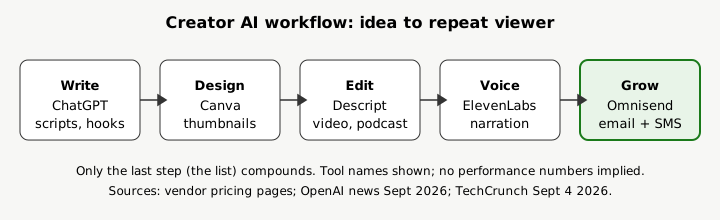
My synthesis after comparing these side by side: buy for your bottleneck, not for completeness. A common lean stack is ChatGPT for writing, Canva for thumbnails, Descript for editing, and Omnisend for the email list that actually pays the bills. Social reach rents attention; the list is the asset you own. Set up the free Omnisend plan early, even before you need automation, so every video and post can point somewhere that compounds.
- Pick the one bottleneck eating your week (usually scripts or editing).
- Add the tool for that job first; learn it before buying anything else.
- Start a free email plan now so subscribers accumulate from day one.
- Check commercial-use rights on every free tier you publish with.
- Re-audit quarterly; model generations turn over fast (see the Sept 2026 GPT-6 Astra and Gemini Spark launches).
FAQ
What are the best free AI tools for content creators?
ChatGPT, Canva, Descript, and ElevenLabs all offer free tiers, and Omnisend's free plan covers 500 emails and 250 contacts per month. Start free everywhere, then pay only for the tool tied to your bottleneck.
Do I need an email tool if I just started creating?
Yes, the free tier costs nothing and subscribers compound. Social algorithms change; your list does not depend on them.
Can AI tools replace an editor or designer?
They replace the repetitive middle (cleanup, resizing, first drafts), not judgment. Creators who review and refine AI output keep quality; those who publish raw output usually see it in retention.
Are AI-generated voices allowed on YouTube?
Policies change, so check YouTube's current monetization rules before building a channel on cloned narration. Original commentary with AI assistance is on safer ground than fully synthetic channels.
Verdict
If you buy one thing from this list, make it the audience asset: start Omnisend free (500 emails/mo, 250 contacts), write with ChatGPT, design in Canva, edit in Descript, and narrate with ElevenLabs only where it fits. That stack covers the full loop from idea to publish to repeat viewer.