6 Best Free AI Tools for Small Business (2026 Roundup)
The short version
TL;DR: If your business sells anything online, start with Omnisend. Its free plan costs $0, covers 500 emails a month to up to 250 contacts, and already includes AI subject-line help, product recommendations, and signup forms. Pair it with the free tiers of ChatGPT and Gemini for content, and you have a working AI marketing setup before spending a dollar.Last updated: 2026-09-04
Small businesses do not need a big AI budget. They need three or four tools that handle real weekly work: writing, design, customer follow-up, and email. Every tool below has a genuinely usable free tier based on official pricing and specs, not a trial that expires in seven days. I checked each vendor's own pricing page and noted exactly where the free tier runs out, so you know when an upgrade is actually worth it.
One note on timing: AI models are moving fast right now. OpenAI published its safety overview for GPT-6 Astra this week (Sept 2026) alongside customer stories, and Google's Gemini Spark just gained the ability to manage Google Photos libraries (TechCrunch, Sept 4, 2026). The free tools below ride on top of exactly these models, so small businesses get the spillover without paying enterprise prices.
| Tool | Best for | Free tier | Where free runs out |
|---|---|---|---|
| Omnisend | Email and SMS marketing with built-in AI | $0, 500 emails/mo, 250 contacts | Larger lists move to paid plans from about $11/mo |
| ChatGPT | Writing, brainstorming, customer replies | Free plan with chat and limited features | Heavy users and newest models need Plus |
| Google Gemini | Google Workspace users, photos, research | Free with a Google account | Advanced features and higher limits need a paid plan |
| Claude | Long documents, careful drafting | Free plan with daily usage limits | Power users hit the daily cap fast |
| Canva | Social graphics, flyers, presentations | Free plan with basic AI features | Full Magic Studio access needs Pro |
| HubSpot CRM | Tracking leads and follow-ups | Free CRM with core tools | Advanced AI and automation are paid |
What is the best free AI email tool for a small store?
Omnisend is the pick here, and it is the one tool on this list where the free tier is generous enough to run a real business on. You get 500 emails a month to 250 contacts at $0 with no credit card required, per the official Omnisend pricing page. That covers a new store's newsletter and a couple of automated flows like welcome emails and abandoned carts.
What makes it belong on an AI list: the free plan includes AI-written signup forms, AI product recommendations that drop the right products into each email based on browsing behavior, and AI-assisted reporting, plus 24/7 support even for free users. Paid plans start around $11 a month as your list grows, which is positioned as roughly a third less than Klaviyo.
What is the best free AI chatbot for everyday business writing?
ChatGPT remains the default answer. The free plan handles product descriptions, reply drafts, social captions, and brainstorming without payment. This week OpenAI showed where the platform is heading: customer stories report Playco cutting manual fixes by half prototyping with GPT-6 Astra and Legora reviewing 41 documents in minutes (both Sept 2026). Free-tier users do not get the top model with full limits, but the capability spillover reaches the free plan over time.
Should a Gmail-based business just use Gemini?
Probably yes. Google Gemini is free with any Google account and lives where many small businesses already work: Gmail, Docs, and Drive. Practical perk this week: Gemini Spark can now edit and curate Google Photos albums, build shared collections, and turn photos into calendar events (TechCrunch, Sept 4, 2026). A shop that photographs its own products gets asset management thrown in.
What is the best free AI tool for long or careful documents?
Claude has a free plan with daily usage limits and a reputation for careful, well-structured drafting. It suits proposals, policies, contracts-to-review (with a lawyer, not instead of one), and long customer guides. The free daily cap is the constraint: fine for a few documents a week, frustrating for all-day use.
What is the best free AI design tool for non-designers?
Canva's free plan covers social posts, flyers, menus, and presentations, with a taste of its Magic Studio AI features like background remover trials and AI-generated images. A shop owner can produce a week's worth of social graphics in an afternoon. Heavy AI use and brand kits sit behind Pro, so treat free Canva as your layout tool and only upgrade when you are designing daily.
What is the best free CRM with AI for a tiny team?
HubSpot CRM is free for its core contact management, deal tracking, and basic marketing tools, with some Breeze AI features included. For a business moving off spreadsheets, the free tier is genuinely enough: log every lead, set follow-up reminders, and see the pipeline in one place. Advanced AI automation is where paid plans begin.
How do you stack these without paying anything?
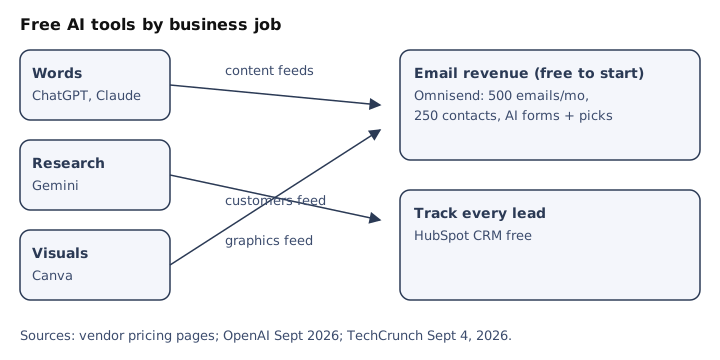
Here is the setup that costs $0 and covers a typical week: write product copy and emails with ChatGPT or Claude, design the visuals in Canva, send the campaign through Omnisend's free plan, and log every new customer in HubSpot. Gemini handles anything inside Google Docs or Photos. The only number to watch is Omnisend's 500-email monthly allowance; when you start bumping into it, that means the emails are working and the roughly $11 upgrade pays for itself.
- Claim the free tiers of ChatGPT, Gemini, and Claude for writing.
- Set up Canva free for a week of social graphics.
- Start your list on Omnisend free with a welcome flow and one campaign.
- Track every lead in HubSpot CRM free.
- Upgrade only the tool you hit the limit on first.
FAQ
Are free AI tools safe for business data?
Read each vendor's privacy terms before pasting customer data or financials into prompts. Free tiers sometimes use inputs for training; anonymize sensitive details or check the opt-out settings.
Which free AI tool saves the most time first?
For most small businesses, an AI chatbot for writing plus an email tool with automation. Drafting and follow-up emails eat hours weekly, and those two categories give them back fastest.
When should I pay for Omnisend instead of staying free?
When your list passes 250 contacts or you send more than 500 emails a month. At that point the Standard plan from about $11 a month usually costs less than the revenue one abandoned-cart flow recovers.
Do I need both ChatGPT and Claude?
No. Start with one chatbot and add the second only if you hit limits or dislike the style. Most owners settle on one daily driver.
The bottom line
You can run AI-assisted marketing for $0 with the free tiers above. The one to set up first is Omnisend's free plan: 500 emails a month, AI recommendations, and signup forms included, with a cheap upgrade path when your list grows. Add a chatbot and Canva, and a two-person business has the output of a much bigger team.